MyFreeCopyright.com Registered & Protected
Showing posts with label Celebrations. Show all posts

February 26, 2012

Happy Birthday!

This week we were asked to use buttons....I love buttons!!!!! I used this as a reason to finish a couple of birthday cards that I've needed to make. They are going to be late...I'm horrible at getting things out on time...but they are now made. (Only one more to go.) This one I made for my niece. She is such a sweet girl. I laid everything out on my gypsy. (I found my inspiration from a Just Cards magazine.)
Then I used my paper from DCWV Sweet Stack to cut out all of the layers.
Then it was time to layer it all up...add thread and buttons...a stamped sentiment and call it "Happy Birthday"
(The other 2 cards are for her twin sisters who turn 3....also sweet sweet girls. I used Nana's Kids paper, celebrations cartridge for the candles and made it simple...after all they are 3. ) I used the "Make a Wish" stamp on both cards. The sprinkles on the cupcakes are tiny buttons...and then the buttons going down the side are threaded with golden thread. The colors remind me of neapolitan ice cream...so ice cream and cake for a bithday....can't be beat.

Angie

June 24, 2011

Queen Bee!

No unfortunately I didn't get my hives yet, but I did make an adorable birthday card. I've been looking through my card folding magazine and seen this accordian fold that screamed make me when I saw it. So after doing some resizing on my gypsy....I started cutting and piecing together. It's a super simple card, and I enjoyed making it for one of my friends daughter's birthday.
The base of my card is 4 3/4x 20 1/2. I used the citrus stack by DCWV. I cut two strips at 10in. (Next time I would cut one at 10 1/4- 10 1/2 in order to account for gluing them together.) The blue strip is folded at 5 in, the yellow at 10 1/4, 12, 16 1/4 and 18 in. I glued the first fold onto the inside of the blue piece,and the others folded to make the accordian part of the card. I then rounded the corners with my corner punch.
Then I went to my gypsy. I used my PAISLEY cartridge to cut out almost the entire card. I love this cartridge, it is so girly, and I have a lot of them around this house. My cuts are as follows:
queen 1/5x4
bee and layers 3 1/2
crown 3
flowers small 1 larger 1 1/2
then for the sentiment I used the celebrations cartridge. It's your day at 1 1/2, happy birthday at 3 in.
After everything was cut it was time to assemble the card.
One of the best things about this card is all of the cuts were made from scraps...which continues to show me why I keep a box of paper pieces when hubby thinks it's trash ;)
I added some buttons and self stick gems to glam it up a bit. The little bee is a button from Fabulous Finds. It took me a bit of time arranging and rearranging before gluing everything down. I wanted the bee's head to reach the crown, and yet look like it was flying when the card is opened. I used zots pop dots to add dimension to the bee and the flowers. The center of the flowers is a button with a larger self stick gem.
I then glued "It's your day" under the crown, but also hidden by the bee when the card is open. "Happy Birthday" was glued to a 4x4 in square and then placed on the inside fold of the card. I think that it turned out really cute for a great "Queen Bee"
I hope this inspires you to get creative with folds. I'm looking forward to trying different folds, either with paper or for the cards. One last pic of it open from the side and then I'll "bee" off ;) (had to go there)
*recipe*
DCWV citrus stack papers
misc. scrap papers
self stick gems
buttons
Paisley and Celebrations cartridges
Zots pop dots, glue


Bee....sure to check in all week to see what new cartridge we will be using!

December 17, 2010

Christmas Tags!

Christmas Tags


Supplies to make: Skate, Stocking, Hat, and Package Tags:


Red, White, and Black Card Stock


Green Patterned Card Stock


Various Scrap Christmas Papers


Red "Half the Edge Bazzill Card Stock Strips"


Cricut Celebrations, Christmas Cheer, Joys of the Season and Christmas Cartridges


Stickles and White Glitter


Glue Pen and Adhesive


Bling


Ribbon


Hole Punch


RECIPE:


Use Christmas Cartridges to cut the Skate, Stocking, and Hat with the Cricut at any size and color card stock, except white. (I cut mine around 4 1/4" high). I use the Gypsy for everything, so the measurements I give are always from it)

Then cut another set of everything in white so that you can cut out and layer onto the colored pieces you just cut.

Then cut the boot part of skate, top and foot pieces of stocking, and the fur pieces for the hat from the white set with scissors so you can layer.

Adhere the white layers to the colored items.

Cut the Package Tag from the Green Patterned Card Stock or whatever color you want at 4 1/2" height with the Cricut Celebrations Cartridge.

Cut a piece of the Red Bazzill Edge Strip to fit across the Green Tag.

Cut the Packages out of various Christmas paper scraps in different sizes to fit the tag. (I used .88", 1.00", and 1.12" height.)

Adhere the Red Bazzill Strip and Packages to the Tag.

Adhere the Packages to the Tag.

Cut (4) To: and From: in Black at .65" height from the Celebrations Cartridge.

Adhere the "To and From" to all of the Christmas Tags.

Use Stickles or any glitter around the areas you want to pop.

Use Bling if you want to.

Punch hole in top of tags where you want the ribbon.

Tie Ribbons through the holes.

Here are some more tags....


- Donna

November 14, 2010

Let It Snow!

Here is another version by Jennifer:

Heya Everyone! I had a chance back on the 11th of this month to sit in on a free class offered by Cricut. When I signed up for this class and saw they were going to be making a banner my wheels got a turnin'. Yes, there was smoke and a lot of screeching but eventually they stopped resisting and turned. ;) When I signed up, they listed the items you would need to complete the same banner they were making. I didn't have anything that they had listed but it didnt keep me from sitting in to get some tips and ideas. I had thought for a week or so on what I want to make for my banner. If you follow my blog or know me, then you would know my choice was simple! I chose to do a winter themed banner that reads 'Let it Snow'. With my obsession being snowflakes, I jumped all over using as many snowflakes as I could. I asked my crafty partner in crime (Kristine) if I could use her Expression because I only have the baby Cricut. I started out with picking 3 different shades of blue paper. The words 'Let It Snow' has 9 letters so I would need 9 sheets of 8x11 (3 pages of each shade) or a 12x12 will fit 2 on each sheet if you roate it.


I pluged in the 'Celebrations' cartridge and and use the foundation of the triangular banner on the bottom right of the key overlay. I set the Chicut to 9 inches and cut out 9 banner triangles.


I then picked out 5 different patterns of winter type paper.


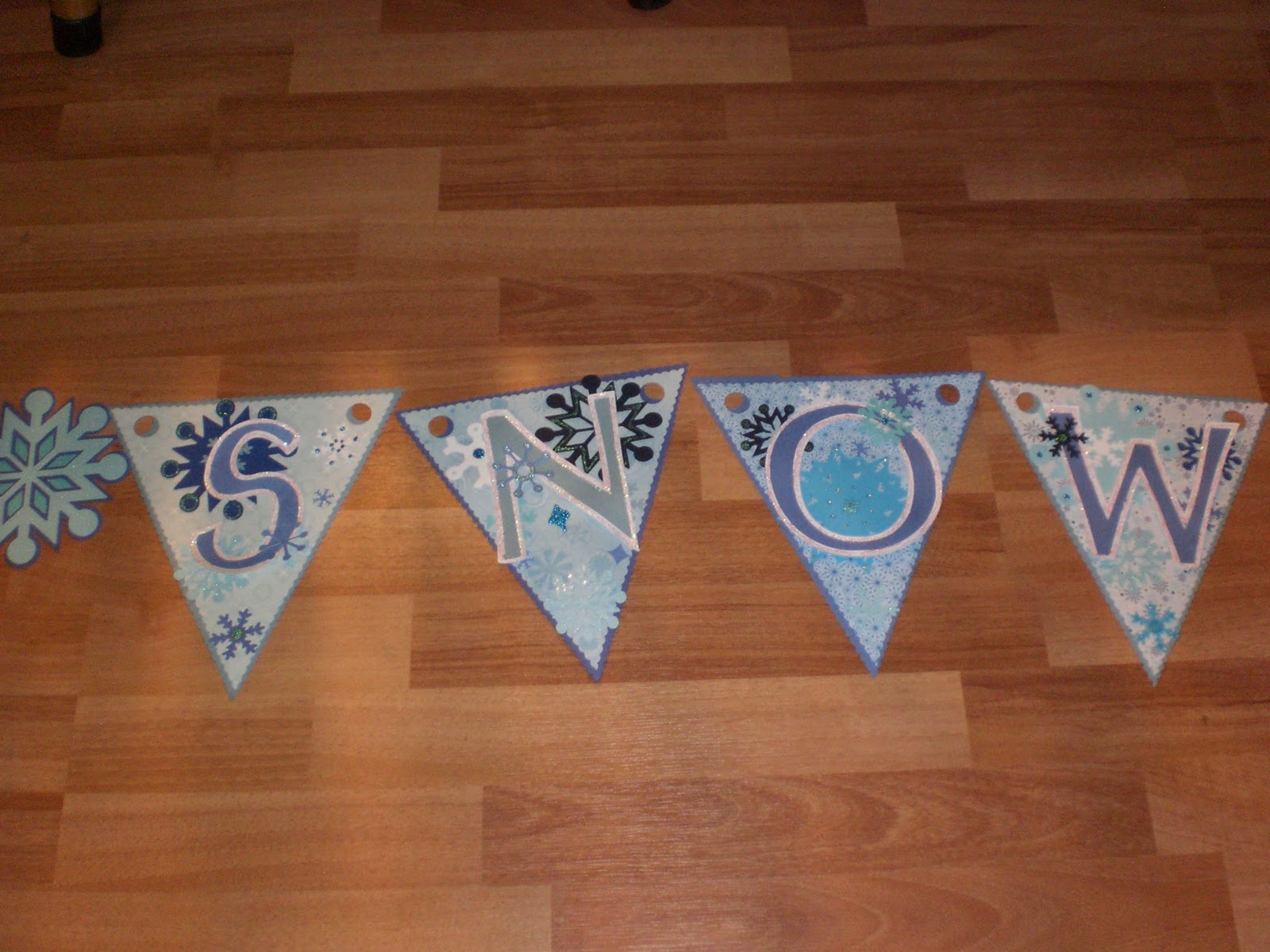
I stuck them down one at a time on the cutting mat and set the Cricut to cut at 8 1/2 inches on the same banner foundation as above. It still looked a little 'sharp ' along the edges to me so I got out my scalloped edged scissors from X-acto and cut the edges of both the blue and patterned paper banners. I looked through a few cartridges and found that Doodlecharms, Accent Essentials and Designers Calendar has snowflakes in them. So I used thoes cartridges to cut out a bunch of miscellaneous sizes, white and shades of blue snowflakes. I glued the snowflakes to the pattered paper banner pieces. Then I plugged in the George and Basic Shapes cartridge and cut out the letters at a size of 4 1/2 inches in the same shades of blue as the banners. Grabbed more white cardstock and cut the shadow image of the same letters I just cut. Glued the letters and their shadows together. I outlined the white part of the shadow letter with irridescent glitter glue.


After the glitter was dry I got out my Helmar Liquid Scrap Dots and glued the letters to the patterned paper banner with snowflakes already glued down.


It still didnt look like I wanted it to look yet...not only do I have an obsession with snowflakes but I bathe in glitter on a regular basis. I think glitter is the answer to world peace. Im not sayin, Im just sayin. So I got out some blue glitter glues and went to work.


I plugged in Accent Essentials again and cut out the word divider snowflakes at 5 inches in light blue cardstock then did it in shadow in dark blue cardstock. Took out Accent Essentials and pluged in George and Basic Shapes and cut out a 3 inch circle in a teal blue and constructed the snowflakes.


After all that, I layed it all out across my floor. Let me tell you something here. For some very strange and odd reason when ever anything is layed on the floor in my house my 2 dogs and my 2 kids think its an invite to come and lay on it or run past it so it flips over or sit on it. I have no idea what draws them to my stuff, on the floor, but it happens EVERY TIME! Back to the instructions.....so I layed it out on the floor so that I could get a general feel of how it will look in its 'banner' form.


Pleased with the results I sifted through my ribbon tin (It is an old vintage tin that was used for ribbon candy. Thought it was kinda fitting :D) and pulled out all the blue ribbon I could find. And tied the banner pieces together.


And the result was a fun and fitting banner I can leave up for pretty much 6 months out of the year here :D :D


I hope that inspires you to make your own fun banner!! If you have any questions about any of the steps you can leave me a comment here or on my own blog! Thanks!!

~*Jen*~

November 13, 2010

Thankful Banner

As you may know, Provocraft had a 'free' online course this week.

It was November 11th at 7pm (mountain) to make this beautiful banner!  It uses the cricut cartridges Country Life and Sentimentals.  They also provided the optional Gypsy cut file before the class. 

Well a few of the SweetSassyDiva Designers decided to share their take on the banner.  I hope you enjoy their take on it.  Also, if you did the banner or had your own twist, please upload and link your picture below.  We would love to see what you create!  You do not have to use their paper package.  Imagine all of the different beautiful banners!

First up......Travelin' Nana!

Well, Travelin' Nana here did not register for the class while she was on the road. So she used the "It's Time for Class" email picture to get an idea of what they were going to teach and hunted up some carts that she could use to create her own. It was definitely fun.


Supplies:

Carts: Stand and Salute, Accent Essentials, and Plantin Schoolbook

Leaf Patterned Paper, Shiny Pumpkin and Truffle (Brown) Card Stock

Stampin Up 1 3/4 Scallop Paper Shaper Punch

Brown and White Ink

Brown and Cream Piercing Thread

Piercing Tool

Needle

Pot Dots and Tape Runner

Cut 8 flags just under 5.59" height from the Shiny Pumpkin card stock for the Banner, from Stand and Salute Cart. in Blackout mode.


Cut the foundation to put the "Thankful" letters on with the Accent Essentials cart. Use Leaf patterned paper and cut 8 at 2.88" height, and cut 8 Brown for the borders at 3.24" height.

Cut the letters for Thankful out of Brown card stock at 1.47" height, using the Plantin Schoolbook Cart. Adhere them to the leaf foundation.


Use brown ink around edges of flag and leaf foundation. I didn't ink the borders.

After inking the Leaf foundation adhere them onto the Borders. Adhere letters to the Leaf foundation, and then adhere that finished element to the flags using three small pop dot on the back of the boarder pieces.

Cut 16 scallop pieces from Brown card stock using the punch. Set 8 aside.

Take 8 of the Brown scalloped pieces and put the words you are thankful for onto them. I choose to paper pierce and sew mine for a homey look. I used the words, God, Family, Church, Home, Friends, Freedom, Health, and Wealth.

Pierce the words you want to use onto the scallop and then use embroidery thread to sew them on the scallop. I cheated and cut white scallops out of printer paper to write my words on and put the white piece over the actual scallop to pierce. Take the white paper away and the sew the words on the actual scallop.

After sewing the words on with cream embroidery thread (quite that challenge as you probably noticed), I glued the other Brown scallop pieces, right side out, to the back of the scallop with the words on them. (no glue at the top middle-see below).

Place and adhere the tip of the flag down into the top middle of the double scallop to hold it on so the glue won't show. Put the glue on the scallop vs the flag as the tip if flimsy.


Thread the flags together using embroidery thread whatever thickness you like. I used the thickness it comes in and choose to thread from back to front because I like that look.

- Donna

Here is another version by Jennifer:

Heya Everyone! I had a chance back on the 11th of this month to sit in on a free class offered by Cricut. When I signed up for this class and saw they were going to be making a banner my wheels got a turnin'. Yes, there was smoke and a lot of screeching but eventually they stopped resisting and turned. ;) When I signed up, they listed the items you would need to complete the same banner they were making. I didn't have anything that they had listed but it didnt keep me from sitting in to get some tips and ideas. I had thought for a week or so on what I want to make for my banner. If you follow my blog or know me, then you would know my choice was simple! I chose to do a winter themed banner that reads 'Let it Snow'. With my obsession being snowflakes, I jumped all over using as many snowflakes as I could. I asked my crafty partner in crime (Kristine) if I could use her Expression because I only have the baby Cricut. I started out with picking 3 different shades of blue paper. The words 'Let It Snow' has 9 letters so I would need 9 sheets of 8x11 (3 pages of each shade) or a 12x12 will fit 2 on each sheet if you roate it.
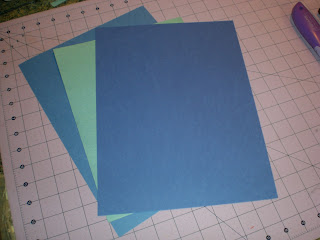


I pluged in the 'Celebrations' cartridge and and use the foundation of the triangular banner on the bottom right of the key overlay. I set the Chicut to 9 inches and cut out 9 banner triangles.


I then picked out 5 different patterns of winter type paper.


I stuck them down one at a time on the cutting mat and set the Cricut to cut at 8 1/2 inches on the same banner foundation as above. It still looked a little 'sharp ' along the edges to me so I got out my scalloped edged scissors from X-acto and cut the edges of both the blue and patterned paper banners. I looked through a few cartridges and found that Doodlecharms, Accent Essentials and Designers Calendar has snowflakes in them. So I used thoes cartridges to cut out a bunch of miscellaneous sizes, white and shades of blue snowflakes. I glued the snowflakes to the pattered paper banner pieces. Then I plugged in the George and Basic Shapes cartridge and cut out the letters at a size of 4 1/2 inches in the same shades of blue as the banners. Grabbed more white cardstock and cut the shadow image of the same letters I just cut. Glued the letters and their shadows together. I outlined the white part of the shadow letter with irridescent glitter glue.


After the glitter was dry I got out my Helmar Liquid Scrap Dots and glued the letters to the patterned paper banner with snowflakes already glued down.


It still didnt look like I wanted it to look yet...not only do I have an obsession with snowflakes but I bathe in glitter on a regular basis. I think glitter is the answer to world peace. Im not sayin, Im just sayin. So I got out some blue glitter glues and went to work.


I plugged in Accent Essentials again and cut out the word divider snowflakes at 5 inches in light blue cardstock then did it in shadow in dark blue cardstock. Took out Accent Essentials and pluged in George and Basic Shapes and cut out a 3 inch circle in a teal blue and constructed the snowflakes.


After all that, I layed it all out across my floor. Let me tell you something here. For some very strange and odd reason when ever anything is layed on the floor in my house my 2 dogs and my 2 kids think its an invite to come and lay on it or run past it so it flips over or sit on it. I have no idea what draws them to my stuff, on the floor, but it happens EVERY TIME! Back to the instructions.....so I layed it out on the floor so that I could get a general feel of how it will look in its 'banner' form.


Pleased with the results I sifted through my ribbon tin (It is an old vintage tin that was used for ribbon candy. Thought it was kinda fitting :D) and pulled out all the blue ribbon I could find. And tied the banner pieces together.


And the result was a fun and fitting banner I can leave up for pretty much 6 months out of the year here :D :D


I hope that inspires you to make your own fun banner!! If you have any questions about any of the steps you can leave me a comment here or on my own blog! Thanks!!

~*Jen*~

Here you have seen three examples.  First, is the class version, another Thankful version and a Let it Snow version!  Would love to see what banner you are inspired to make!  Pst your picture on facebook.

- SweetSassyDiva